Schedule or Publish Your Content
Your content is ready. Now get it in front of your audience. 🚀
iBrand gives you simple ways to schedule, publish, or share your finished content.
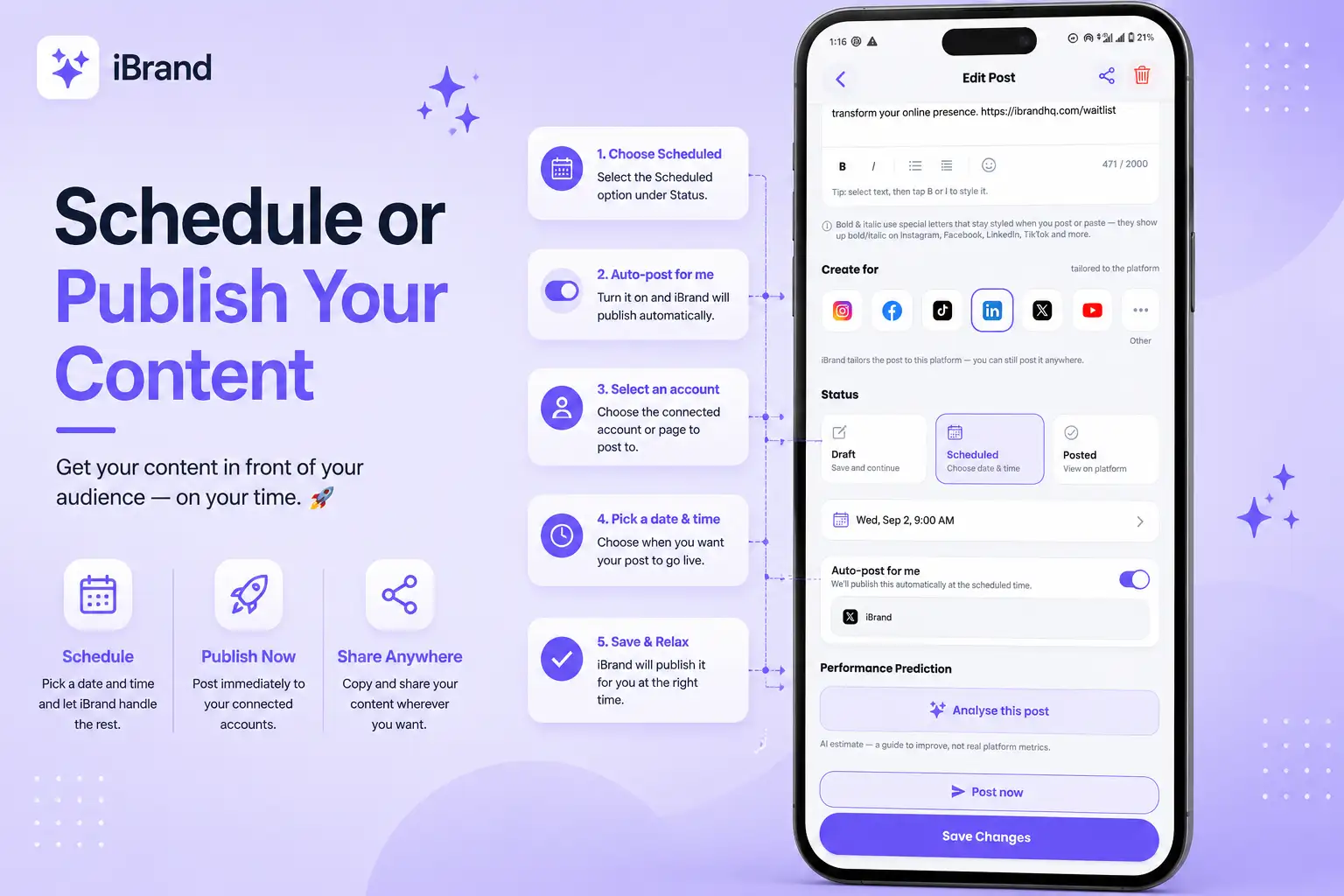
Schedule for later
Want iBrand to publish it for you automatically?
Open your post
Tap the post you want to publish.
Choose Scheduled
Under Status, tap Scheduled.
Turn on Auto-post
Enable the Auto-post option so iBrand can publish the post automatically at your chosen time.
Select an account
Choose the connected social account or page you want iBrand to post to.
Pick a date & time
Set when you want the post to go live.
Save your changes
That's it! iBrand will automatically publish the post to your selected account at the scheduled time.
Post now
Want to publish immediately?
Tap Post now and choose the connected social account or page you want to publish to.
Share it yourself
You can also tap the Share button at the top of the post.
iBrand copies your post text and opens your device's sharing options with the image, making it easy to share wherever you want.
Pro tip
Planning ahead? Schedule several posts at once and turn on Auto-post.
iBrand can handle the publishing while you focus on your business.
📅 Plan it.
🤖 Automate it.
🚀 Keep showing up.