Set Up Your Brand in 2 Minutes
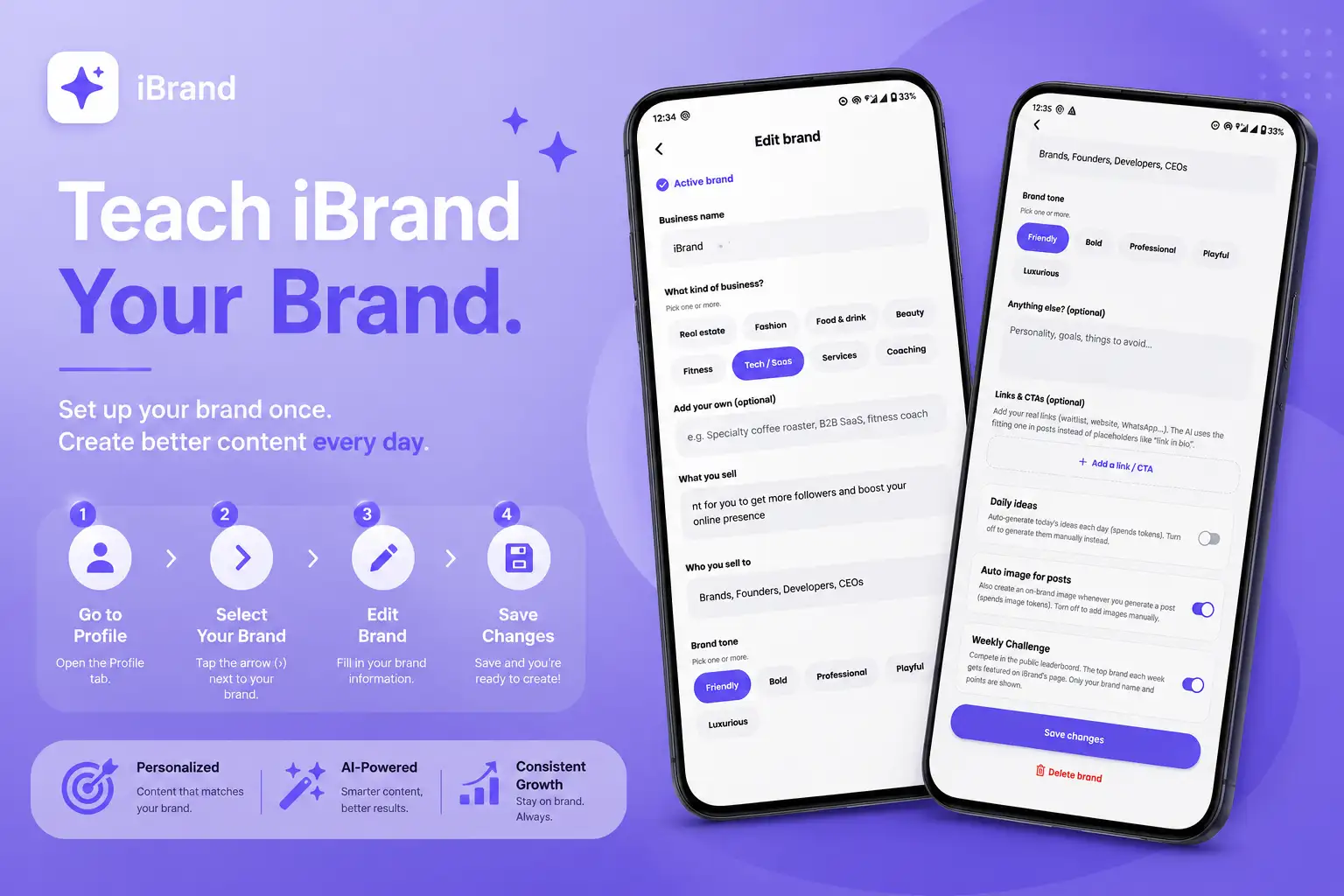
Before iBrand can create content that sounds like you, it needs to understand your brand. Your brand profile gives the AI the context it needs to create more relevant and personalized content.
How to set up your brand
Open your Profile
Go to the Profile tab in the bottom navigation.
Choose your brand
Find the brand you want to set up and tap the arrow (›) beside it to open its settings.
Open Edit Brand
You'll see the information iBrand uses to understand your brand.
Add your Business Name
Enter the name your audience knows your brand by.
Select your Business Type
Choose the option that best describes your business.
Tell iBrand what you sell
Describe your products or services clearly. The more specific you are, the better.
Tell iBrand who you sell to
Describe your ideal customers or audience.
Choose your Brand Tone
Pick the tone that best represents how your brand communicates.
Add anything else iBrand should know
Share extra information, preferences, or instructions that can help iBrand create better content for you.
Add your Links & CTAs
Add important links and calls-to-action you want iBrand to include in your content.
Save your changes
Tap Save Changes and you're ready to create.
Pro tip
Don't rush your brand profile. Think of it as teaching iBrand how to think about your business. A clear description of your audience, products, and brand voice will help produce much more relevant content.
The better iBrand knows your brand, the better your content becomes. 💜